

Introduction
“We already have automation, so we don’t need orchestration.” It’s one of the most common and most expensive assumptions in enterprise tech right now.
The confusion is understandable. Automation, integration platforms, and AI orchestration all promise to connect systems and reduce manual work, and every vendor blurs the lines to fit their product. But they’re not the same thing, and buying the wrong one means either paying for power you won’t use or hitting a wall the moment your process gets complicated.
This guide draws the lines clearly. You’ll see what task automation, workflow automation, iPaaS, and AI orchestration each actually do, where one ends and the next begins, and a simple test for figuring out which layer your business needs. If you want the broader picture first, start with the overview of what an AI orchestration platform is.
The Automation-to-Orchestration Ladder
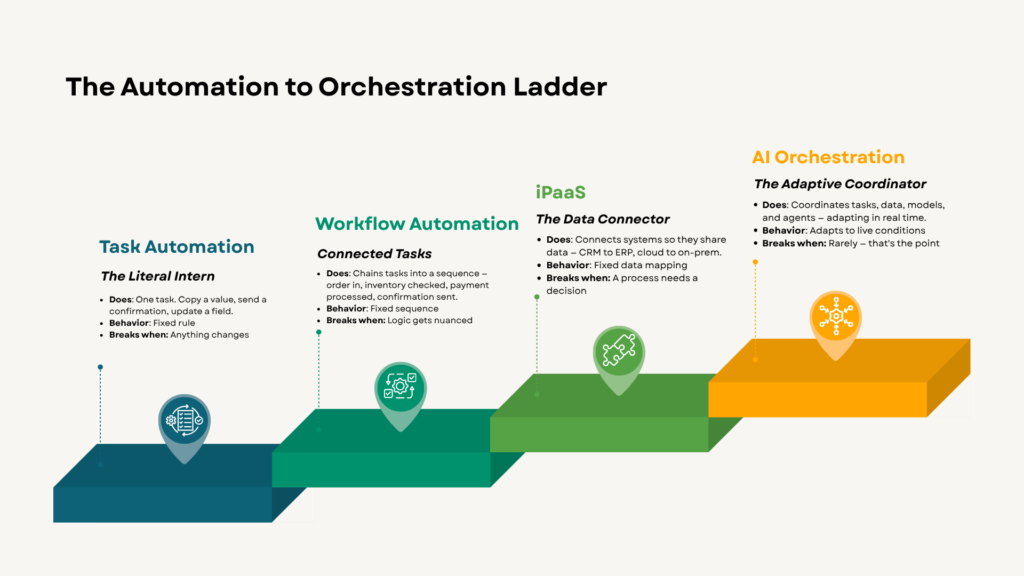
The clearest way to understand the difference is to see these as rungs on a ladder, each adding capability.
Task automation: the literal intern
Task automation performs a single, narrowly defined job a human used to do by hand — copying a value, sending a confirmation, updating a field. Technologies like robotic process automation live here.
Task automation is like hiring a fast, literal intern: it does exactly what you say, step by step, without improvising. That’s a strength for repetitive clicks and a weakness the moment anything changes.
Workflow automation: connected tasks
Workflow automation chains several tasks into a sequence. An order comes in, inventory gets checked, payment processes, status updates, a confirmation email fires, all triggered automatically. To get a broader understanding of what workflow automation is all about, read our comprehensive guide.
It’s more capable than single-task automation, but it still follows a fixed script. It handles routine, well-defined processes within a few systems. Ask it to manage nuance or adapt, and it struggles.
iPaaS: the data connector
An integration platform as a service connects disparate applications so they can share data: your CRM talking to your ERP, cloud apps syncing with on-premises systems. Integration platforms move data between systems, while workflow automation automates tasks within them. For an in-depth insight on what an iPaaS is, explore our blog titled, “What is an iPaaS? A Guide to Integration Platform as a Service”
iPaaS is built for complex, high-volume data movement across many systems. But moving data isn’t the same as coordinating a process, a lesson many teams learn the hard way. You can connect ten systems and still have no intelligence deciding what happens next.
AI orchestration: the adaptive coordinator
AI orchestration sits at the top. It coordinates tasks, data, models, and agents across your entire stack. It critically adapts in real time. Where automation follows rigid rules, orchestration sequences tasks based on live conditions rerouting when a step fails, adjusting to system health, flagging issues before they cascade. Learn more about AI Orchestration in our blog title, what is an AI orchestration platform, and why your business needs one?
That adaptability is the whole difference. A rule-based flow copying data between systems fails if one field changes unexpectedly. An orchestrated workflow adjusts and keeps moving. The mechan
📊 Side-by-Side: Where Each Layer Fits
| Dimension | Task Automation | Workflow Automation | iPaaS | AI Orchestration |
|---|---|---|---|---|
| Primary job | Do one task | Chain tasks | Move data between systems | Coordinate the whole process |
| Behavior | Fixed rule | Fixed sequence | Fixed data mapping | Adapts to live conditions |
| Handles exceptions? | No | Barely | Limited | Yes — reroutes and retries |
| Best for | Repetitive clicks | Routine multi-step tasks | High-volume data sync | Complex, cross-system AI workflows |
| Breaks when… | Anything changes | Logic gets nuanced | Process needs decisions | Rarely — that's the point |
Why the Distinction Costs Real Money
Picking the wrong layer has consequences in both directions.
Buy too low, and you hit a ceiling. Teams deploy workflow automation expecting orchestration-level outcomes, fewer exceptions, end-to-end coordination and end up disappointed, stitching together dozens of micro-automations that never quite add up.
Buy too high, and you over-engineer. Not every process needs adaptive AI coordination. A simple, stable data sync between two apps is an integration job, not an orchestration one. Spending on the top rung for a bottom-rung problem wastes budget and adds complexity you’ll maintain forever.
How do you know which one you need?
Run this test. If the problem is inefficiency inside one system, look at workflow automation. If the problem is systems that can’t talk to each other, that’s integration. If the problem is a multi-step process that spans systems, involves AI decisions, and has to handle exceptions without breaking that’s orchestration. See how these map to actual business processes in the AI workflow orchestration use cases.
When These Layers Work Together
Here’s what marketing rarely tells you: these aren’t competitors. They’re a stack.
Orchestration doesn’t replace integration or automation; it sits above them and puts them to work. The orchestration layer might trigger an integration to pull data, fire an automation to update a record, and route an AI decision in between. In practice, the strongest setups combine connectivity, automation, and intelligence in one governed place instead of scattering them across separate tools that create governance gaps.
The goal isn’t to pick one rung. It’s to have a coordinating layer smart enough to use all of them.
Its Not One or The Other – It’s a Stack
Three things to remember. Automation does a task, integration moves data, and orchestration coordinates the process while adapting to reality. The dividing line between them is adaptability: rules break, orchestration bends. The right choice depends entirely on the problem you’re solving, not on which term sounds most advanced.
Most growing businesses eventually need all three layers working as one. That’s the design behind Aekyam connectivity, automation, and AI orchestration in a single platform, so you’re not gluing tools together and hoping they hold.
Not sure which layer your process needs? Talk to our team and walk through your toughest workflow. Which of these three is your current stack weakest on? Let us know below.
Frequently Asked Questions
What's the simplest way to explain AI orchestration vs. automation?
Automation does one job on command; AI orchestration coordinates many jobs across tools and adapts when things change. If automation is a single worker following instructions, orchestration is the manager who assigns the work, handles surprises, and makes sure the whole process finishes. The key difference is that orchestration adjusts in real time, while automation just repeats a fixed script.
Is iPaaS the same as AI orchestration?
No. An integration platform (iPaaS) specializes in moving data between applications reliably and at scale. AI orchestration goes further, it coordinates the entire process, including AI decisions, exception handling, and multi-step logic across those connected systems. iPaaS gives you connectivity; orchestration gives you connectivity plus intelligence and adaptability on top.
Can I use workflow automation and AI orchestration together?
Yes, and most mature setups do. Orchestration doesn't replace workflow automation, it sits above it and calls on it when needed. The orchestration layer decides what should happen, then triggers the right automation, integration, or AI step to do it. Think of automation as the muscle and orchestration as the brain directing it.
Does AI orchestration replace my existing integration tools?
Not necessarily. It usually coordinates them rather than replacing them. A good orchestration platform works with your existing connections and automations, adding the decision-making and adaptability layer on top. That said, consolidating connectivity, automation, and orchestration into one platform can reduce the governance gaps and tool sprawl that come from managing several separate systems.
What business problems does an AI orchestration platform solve?
It solves fragmentation — disconnected AI tools, siloed data, brittle integrations, and inconsistent oversight. Instead of each department running its own AI island, orchestration connects them into coordinated workflows with reliable data flow and centralized control. The practical results are more accurate AI output, automation that adapts instead of breaking, and the ability to scale new workflows without a proportional jump in maintenance work.
When is basic automation enough, and when do I need orchestration?
Basic automation is enough when your process is simple, stable, and lives inside one or two systems with predictable inputs. You need orchestration when the process spans multiple systems, involves AI or dynamic decisions, and has to handle exceptions gracefully. A reliable signal: if your automation keeps breaking whenever something unexpected happens, you've outgrown it and need a coordinating layer that adapts.
Why do people confuse these three categories so often?
Because vendors deliberately blur the lines to make their product sound like it does everything. Many automation tools now claim orchestration features, and many integration platforms have added automation, so the marketing language overlaps heavily. The practical way to cut through it is to ignore the labels and ask what a tool actually does: run a task, move data, or coordinate and adapt an end-to-end process.
Which layer should a small or mid-sized business start with?
Start with the layer that matches your most painful bottleneck, not the most advanced one available. If manual data entry between apps is the pain, integration solves it. If repetitive multi-step tasks eat your team's time, workflow automation helps. If you're deploying AI across processes and need it all coordinated, orchestration is worth it, and platforms that scale across business sizes let you begin small and grow into it without switching tools later.
Share
Read Similar Blogs