


What is AI Workflow Automation?
AI Workflow Automation is the use of artificial intelligence to design, execute, and optimize multi-step business processes, enabling systems to not just follow rules, but to understand context, learn from data, and make judgment-based decisions autonomously.
How Traditional Workflow Automation Works?
Traditional automation works by following rules humans write in advance:
- If a form is submitted, send a confirmation email
- If an invoice arrives, route it to accounts payable
- If a field is missing, flag it for review
It works well for structured, predictable tasks. The moment something unexpected happens, a human has to step in.
How AI Changes Things
AI brings context and learning into automation. It can:
- Read an unstructured email and figure out if it is a complaint or a purchase order
- Extract key clauses from a scanned contract without being told where to look
- Predict which support tickets will escalate and prioritize them
- Improve over time as it processes more data
The result is automation that handles complex and variable tasks, not just clean, predictable ones.
How AI Workflow Automation Works
Think of it as a five-step cycle that runs automatically, every time, without human involvement unless it is genuinely needed.
The 5-Step Process
| Step | Stage | What Happens |
|---|---|---|
| 01 | Trigger | An event fires. For example, an email arrives, a form is submitted, a schedule kicks in, or an API sends a signal. The workflow wakes up. |
| 02 | Data Input | The workflow receives data: structured (form fields, database records) or unstructured (emails, PDFs, voice recordings). AI handles both. |
| 03 | Processing | AI models interpret context, classify intent, and make judgment calls all in seconds. |
| 04 | Action | The workflow acts; it sends a notification, updates a record, generates a document, routes to a human, or calls an external system. |
| 05 | Feedback Loop | Outcomes are captured and fed back into the system. The AI learns what worked and gets sharper over time. |
Where AI Plugs Into a Workflow
AI does not replace the entire workflow. It slots in at specific points where intelligence is needed most:
| AI Capability | What It Does in the Workflow |
|---|---|
| Document Extraction | Pulls structured data from emails, PDFs, and scanned files without manual data entry |
| Classification | Sorts inputs by type, urgency, or intent and routes them to the right team or system |
| Decision Support | Recommends the best next action based on historical patterns and real-time context |
| Content Generation | Drafts responses, summaries, reports, or documents automatically based on input data |
| Anomaly Detection | Flags outliers, errors, or exceptions before they escalate into bigger problems |
Rule-Based vs. Self-Learning Workflows
Not every part of an AI workflow learns on its own. Here is the difference:
| Rule-Based | Self-Learning | |
|---|---|---|
| How it works | Follows pre-written logic exactly | Learns from feedback and new data |
| Best for | Stable, well-defined processes | Complex, variable processes that evolve |
| Updates | Requires manual changes when logic shifts | Adapts automatically over time |
Most enterprises use both, rules for the backbone and AI for the decision-heavy steps.
Workflow Automation vs. AI-Driven Workflow Automation: What is the difference?
Both automate tasks but they handle complexity very differently.
| Category | Traditional Automation | AI-Driven Automation |
|---|---|---|
| How it works | Follows a fixed, pre-programmed script | Reads context and makes decisions in real time |
| Data it handles | Structured data only | Structured and unstructured data |
| Flexibility | Needs reprogramming when processes change | Adapts as inputs and conditions change |
| Scalability | Scales well for volume | Scales for volume and complexity |
| Exceptions | Humans handle all exceptions | AI manages many exceptions automatically |
| Auditability | Clear, easy-to-trace decision paths | Requires additional documentation for AI decisions |
| Best used for | Payroll, scheduled reports, data transfers | Document review, fraud detection, customer comms, forecasting |
In practice, most enterprises combine both.
Read our comprehensive blog, Mapping the Differences: Workflow Automation vs. AI-Driven Workflow Automation, to get an in-depth insight.
Why Are Enterprises Switching to AI Workflow Automation?
Today, data volumes are higher, processes change faster, and customer expectations are more demanding. Rule-based tools cannot keep up on their own. AI workflow automation steps in and adds intelligence into these processes. Learn more about what is pushing businesses to go ahead and move towards AI workflow automation in our blog Why Enterprises Are Suddenly Shifting Towards AI Workflow Automation.
What Sort of Business Pressures Led to the Switch?
- Customers expect personalized, real-time responses across every channel
- Supply chains are more complex and need faster, adaptive decisions
- Regulatory requirements demand more rigorous documentation and reporting
- Labor costs are rising, making headcount-led growth unsustainable
Where Legacy Automation Falls Short
- Built for clean, structured data; struggles with emails, PDFs, and voice inputs
- Breaks when processes change and rules need to be rewritten
- Generates more manual work as exception rates climb
- Siloed tools create bottlenecks rather than end-to-end automation
What Enterprises Are Trying to Solve
- Do more without adding headcount
- Respond to customers and market changes faster
- Reduce errors in high-volume processes
- Turn unstructured data into useful, actionable information
- Scale operations without scaling costs at the same rate
How Are Businesses Benefiting from AI Workflow Automation?
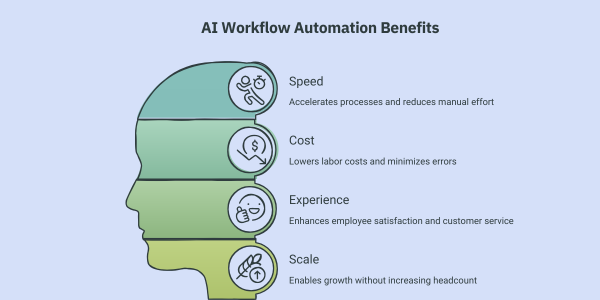
The benefits show up across four areas: speed, cost, experience, and scale.
Read our detailed blog on the benefits of AI Workflow Automation to understand in what ways businesses using AI workflow automation have an edge.
Faster Processes, Less Manual Work
- Tasks that took hours like, document review, data extraction, routine responses, now take seconds
- Manual handoffs between teams are eliminated
- Finance teams close books in hours instead of days
- HR teams screen hundreds of applications during hiring surges without adding staff
Lower Costs, Fewer Errors
- Reduces labor cost per transaction for high-volume tasks
- Consistent processing eliminates the errors that come with manual work
- Catches anomalies in real time, reducing downstream correction costs
- In regulated industries, even small error rate improvements translate into significant savings
Better Experience for Employees and Customers
- Employees spend less time on repetitive tasks and more on meaningful work
- Reduced manual burden tends to improve job satisfaction and reduce attrition
- Customers get faster, more personalized responses
- Inquiries that took two days to resolve can be handled in minutes
Scale Without Adding Headcount
- The same infrastructure that handles 1,000 transactions can handle 1,000,000
- Seasonal spikes no longer require emergency hiring
- Expanding into new markets does not depend on building local operational teams
- Growth becomes a product of capability, not just capacity
Where Is AI Workflow Automation Being Used?
Retail and Supply Chain
- Automated inventory replenishment based on real-time sales and demand signals
- Purchase order processing without manual data entry
- Supplier performance monitoring and exception flagging
- Logistics adjustments triggered automatically by disruption signals
Finance and Banking
- Loan processing: documents reviewed, data extracted, and decisions made automatically
- Fraud detection: transaction patterns analyzed in real time, alerts triggered instantly
- Compliance: relevant data pulled from communications and populated into regulatory reports
- Customer onboarding: identity verification and account setup handled end to end
HR and Operations
- Resume screening and candidate ranking during high-volume hiring periods
- Interview scheduling and automated candidate communications
- Onboarding: system access, policy documents, and orientation sessions managed automatically
- Employee query resolution through AI-powered self-service tools
Healthcare and Manufacturing
- Patient intake, appointment scheduling, and insurance pre-authorization automated
- Clinical documentation and billing coding assisted by AI
- Equipment failure predicted in advance through sensor data analysis
- Quality control enhanced by AI-powered inspection of production line images
Customer Support
- Routine requests (order status, password resets, account queries) resolved without agents
- Complex issues routed to the right human immediately, without manual triage
- Agents supported with real-time suggestions, knowledge base retrieval, and conversation summaries
- 24/7 availability through AI-powered self-service without additional staffing
For a comprehensive view of how industries are using AI workflow automation across their functions, read our blog, Exploring Real-life Use Cases of AI Workflow Automation.
What Challenges Does AI Workflow Automation Pose?
AI workflow automation delivers real value, but implementation is not without obstacles. Here are the most common ones enterprises face:
Data Quality and Integration
Data in most organizations is fragmented across systems and inconsistently formatted, meaning connecting AI workflows to existing sources requires significant integration effort. When data quality is poor, model output suffers directly, making automation unreliable.
Resistance to Change
Employees often fear job displacement and distrust decisions made by algorithms, and new tools naturally disrupt established habits. This leads to low adoption rates and workarounds that quietly undermine the value of the automation investment.
Security, Privacy, and Governance
AI workflows typically process large volumes of sensitive data across multiple systems, which creates meaningful risk exposure. Regulated industries face additional pressure around explainability and auditability, making clear governance frameworks essential for defining who is responsible when AI makes a decision.
Cost and ROI Uncertainty
The upfront costs of licensing, integration, data cleaning, and change management are substantial, and value is difficult to quantify early, especially when baseline metrics aren’t captured before the project begins. This leaves many programs vulnerable to budget pressure before they’ve had the chance to prove their worth.
How Do You Tackle Those Challenges?
Start Small with the Right Pilot
- Choose a process that is high-volume, self-contained, and low-risk
- Define success metrics before you start
- Use the pilot to generate evidence, learning, and stakeholder confidence
Get Your Data and Infrastructure Ready First
- Audit your data sources for quality, completeness, and consistency
- Build the integration pipelines your workflow will depend on
- Establish data governance policies before models are deployed
- Fixing data problems retroactively costs far more than addressing them upfront.
Bring the Right People at an Early Stage
- Process owners: understand the current workflow and its pain points
- IT and data teams: manage the systems and data the workflow depends on
- Compliance and legal: validate that automated decisions meet regulatory requirements
- End users: their buy-in is essential for adoption and sustained performance
Choose a Platform Built for Enterprise Needs
- Robust security and access controls
- Flexible integration with existing enterprise systems
- Governance and audit features built in
- Ability to deploy and manage models at scale without heavy custom engineering
How to Implement AI Workflow Automation in Your Enterprise
A Four-Phase Framework
- Phase 1 — Assess: Map your workflows. Identify automation candidates by volume, variability, and value. Audit your data and integration landscape.
- Phase 2 — Pilot: Deploy automation on one or two high-impact processes. Set metrics upfront. Monitor, measure, and collect feedback.
- Phase 3 — Refine: Fix what the pilot revealed: model gaps, integration issues, data quality problems, and change management needs.
- Phase 4 — Scale: Extend to additional processes with a proven playbook. Build a center of excellence to maintain standards and support adoption.
What to Measure Along the Way
- Cycle time reduction: how much faster is the automated process vs. the manual baseline?
- Error rate: is AI decision quality meeting acceptable thresholds?
- Straight-through processing rate: what share of transactions completes without human intervention?
- Employee hours reclaimed: how much manual effort has been eliminated?
- Cost per transaction: is the automated process more economical than the manual one?
- Customer satisfaction: is automation improving or degrading the customer experience?
Read our blog on how to implement AI workflow automation to know about the best practices, challenges and how to tackle them.
Transforming Enterprise Workflow with AI
AI workflow automation is changing how enterprises operate by moving beyond rigid, rule-based processes to systems that can understand context, make decisions, and continuously improve. By combining traditional automation with AI capabilities such as document intelligence, classification, predictive analysis, and content generation, organizations can streamline operations, reduce costs, improve accuracy, and scale more effectively.
Successful adoption, however, requires more than technology. Enterprises need a clear strategy, high-quality data, strong governance, and a phased implementation approach that balances quick wins with long-term transformation.
Aekyam is purpose-built to help enterprises design, deploy, and scale AI workflow automation. With deep integration capabilities and a platform designed for complex enterprise environments, Aekyam helps teams move from assessment to impact quickly. Whether you are running your first pilot or scaling an existing program, Aekyam supports you at every stage.
Request a live demo or contact the team to see the platform in action.
Frequently Asked Questions
1. How can I automate email replies based on context?
AI workflow automation reads incoming emails, classifies them by intent (complaint, inquiry, order request), and either sends an automated reply for routine cases or drafts a response and routes it to the right agent for complex ones. Response times drop significantly, and consistency improves across high volumes of inbound mail.
2. What can I do to reduce onboarding delays during hiring surges?
You can use AI workflow automation to automate the time-consuming processes. AI workflow automation triggers the full onboarding sequence the moment an offer is accepted: system provisioning, document distribution, orientation scheduling, and completion tracking all happen automatically. Every new hire moves through the same process at the same speed, regardless of how many people are joining at once.
3. What can I do to reduce customer waiting times?
AI workflow automation handles routine requests around the clock without agent involvement and routes complex ones to the right person immediately. Customers get faster answers, agents spend less time on triage, and resolution rates improve across the board.
4. How can I reduce higher operational costs?
AI workflow automation reduces labor cost per transaction, lowers error rates that generate rework, and allows the same infrastructure to handle significantly more volume without adding headcount. The biggest savings typically come from high-volume processes where manual effort is currently highest.
5. How can I process emails, contracts, and customer conversations into my database?
AI workflow automation uses document intelligence and natural language processing to extract structured data from unstructured sources like, emails, contracts, transcripts and writes it directly to the right database records. No manual data entry required, and data is consistently formatted across all channels.
6. How can Aekyam help with AI workflow automation?
Aekyam provides an enterprise-grade platform that connects your existing systems, embeds AI at key decision points, and gives your team the tools to build and manage automated workflows without deep technical expertise. From initial assessment to full-scale deployment, Aekyam supports every stage of the journey.
Share
Read Similar Blogs