


Introduction
Most explanations of AI orchestration stop at the conductor analogy and leave it there. Useful for a first impression, but useless when you’re evaluating a platform or debugging why a workflow stalled.
So let’s open the hood. Underneath the metaphor, an AI orchestration platform is a set of distinct architectural layers, each with a specific job. When they work together, a request flows through cleanly: data gets pulled, a model acts, the result gets validated, exceptions get routed, and everything gets logged. When one layer is weak, that’s where things break.
This guide walks through the core components, how a request actually moves through them, and what to look for in each. If you’re newer to the topic, the overview of what an AI orchestration platform is, is the right starting point. Here, we go a level deeper.
The Core Layers of an Orchestration Architecture
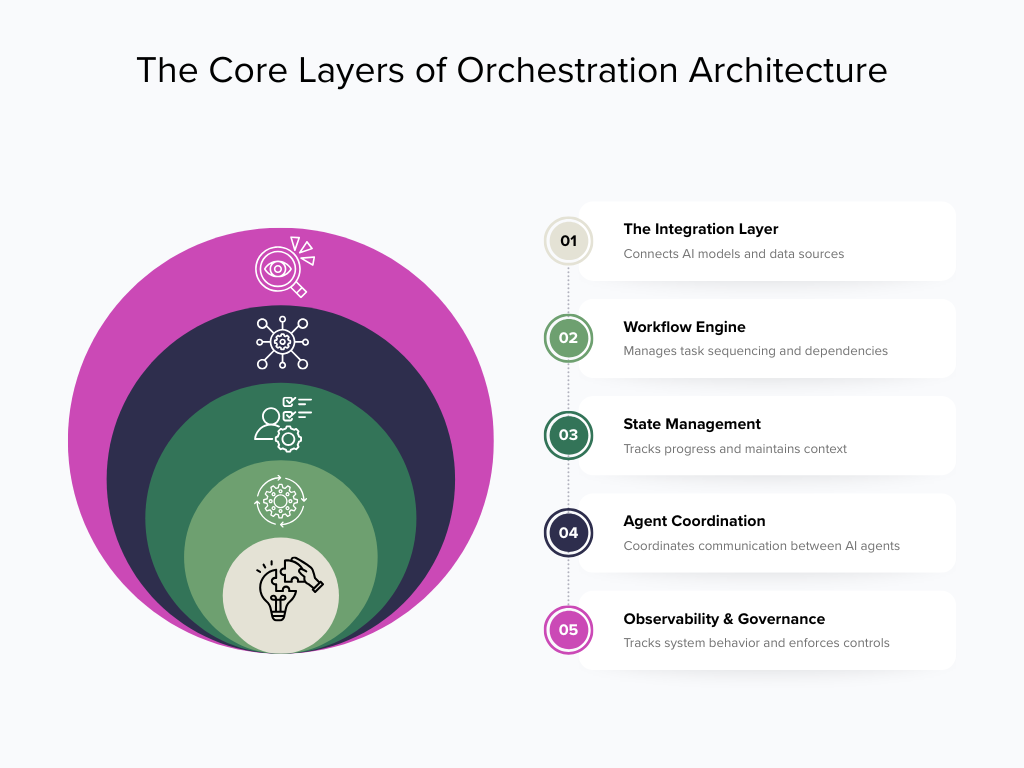
Think of the architecture as five layers stacked from the data up to the oversight.
The integration layer: the foundation
Everything starts here. The integration layer connects AI models, data sources, and applications through APIs and connectors, so agents and workflows can reach the information they need without a custom pipeline built for each source.
This layer is why pre-built connectors matter so much. Instead of engineering a new integration for every system, you draw from a library of ready-made connectors that can cut setup from days to hours. Integration forms the foundation, tool calling and function calling are the core mechanisms that let AI reach out and act.
The workflow engine: the sequencer
The workflow engine manages task sequencing, dependencies, and conditional logic across every operation. It’s the part that knows step two can’t start until step one succeeds, and that a failed check should branch to a different path.
This is where “if this, then that” logic lives — but far more sophisticated than a simple rule. The engine coordinates parallel tasks, enforces order where it matters, and applies conditional branching based on what each step returns.
State management: the memory
Multi-step AI workflows need memory. State management tracks progress, handles retries, and maintains context across steps, so the platform always knows where a process is and what’s happened so far.
Without it, every step would be blind to the last. State management is what lets a workflow pause for a human approval, resume cleanly, and survive a restart without losing its place — the difference between a prototype and a production system.
The agent-coordination layer: the traffic controller
When multiple AI agents are involved, this layer coordinates communication and task delegation between them — deciding which agent handles what, when context passes between them, and how work moves toward completion. It’s the piece that turns a set of individual agents into a coordinated team. Because this layer is a discipline of its own, it gets a full treatment in the guide on coordinating multi-agent systems.
Observability and governance: the oversight
Running across all the layers above is oversight. Observability tracks system behavior, task success rate, error rate, latency, cost per task, so operators can catch problems before they become incidents. Governance enforces access controls, audit logs, and human-in-the-loop checkpoints inside the workflow.
Crucially, these guarantees are built in, not bolted on: data moves reliably, tasks execute consistently, and security is present at every step by design.
How a Request Actually Flows Through the Architecture
Theory is easier to trust when you can trace it. Take an invoice-processing workflow.
An invoice arrives by email. The integration layer extracts the document and pulls related purchase-order data from the ERP. The workflow engine routes the invoice to an AI model for classification and data extraction, then sequences a validation step against the purchase order. State management tracks each step and holds context. If amounts don’t match, the engine branches, routing the exception to a human reviewer instead of forcing the flow through. Approved invoices move to the payment queue. And every step gets logged for the audit trail.
That’s the architecture in motion: five layers, one clean flow, no custom glue code holding it together.
The Architecture at a Glance
| Layer | Job | What to look for |
|---|---|---|
| Integration | Connect models, data, and apps | Broad pre-built connector library, API support |
| Workflow engine | Sequence tasks, dependencies, logic | Conditional branching, parallel execution |
| State management | Track progress, retries, context | Checkpointing, resumable workflows |
| Agent coordination | Delegate and hand off between agents | Shared context, fault isolation |
| Observability & governance | Monitor, log, control | Real-time metrics, audit logs, access controls |
What Separates Production-Grade Architecture From a Prototype
Plenty of tools can demo a working flow. Far fewer hold up in production, and the architecture is why.
The gap usually shows in the unglamorous layers. Weak state management means workflows can’t recover from a restart. Thin observability means failures hide until they cause damage. Shallow governance means you can’t prove what an AI action did — a dealbreaker in regulated industries. When you evaluate a platform, look for a depth across every layer, not just a slick builder on top. A polished interface over a shallow architecture is where integration debt quietly accumulates.
The Takeaway: Architecture Beats Assembly
Three takeaways. An AI orchestration platform isn’t one thing, it’s five coordinated layers, from integration up through governance. A request flows through them cleanly when each layer is solid, and stalls at whichever one is weakest. And the layers that matter most in production are often the ones demos skip state, observability, and governance.
Understanding this architecture is what lets you evaluate platforms on substance. It’s the model Aekyam is built on integration, orchestration, intelligence, and governance in one place, so the layers actually fit together instead of being assembled from parts.
Want to see the architecture applied to your systems? Request a demo and bring a real workflow. Which layer does your current setup struggle with most?
Frequently Asked Questions
What's the simplest way to explain AI orchestration vs. automation?
Automation does one job on command; AI orchestration coordinates many jobs across tools and adapts when things change. If automation is a single worker following instructions, orchestration is the manager who assigns the work, handles surprises, and makes sure the whole process finishes. The key difference is that orchestration adjusts in real time, while automation just repeats a fixed script.
Is iPaaS the same as AI orchestration?
No. An integration platform (iPaaS) specializes in moving data between applications reliably and at scale. AI orchestration goes further, it coordinates the entire process, including AI decisions, exception handling, and multi-step logic across those connected systems. iPaaS gives you connectivity; orchestration gives you connectivity plus intelligence and adaptability on top.
Can I use workflow automation and AI orchestration together?
Yes, and most mature setups do. Orchestration doesn't replace workflow automation, it sits above it and calls on it when needed. The orchestration layer decides what should happen, then triggers the right automation, integration, or AI step to do it. Think of automation as the muscle and orchestration as the brain directing it.
Does AI orchestration replace my existing integration tools?
Not necessarily. It usually coordinates them rather than replacing them. A good orchestration platform works with your existing connections and automations, adding the decision-making and adaptability layer on top. That said, consolidating connectivity, automation, and orchestration into one platform can reduce the governance gaps and tool sprawl that come from managing several separate systems.
What business problems does an AI orchestration platform solve?
It solves fragmentation — disconnected AI tools, siloed data, brittle integrations, and inconsistent oversight. Instead of each department running its own AI island, orchestration connects them into coordinated workflows with reliable data flow and centralized control. The practical results are more accurate AI output, automation that adapts instead of breaking, and the ability to scale new workflows without a proportional jump in maintenance work.
When is basic automation enough, and when do I need orchestration?
Basic automation is enough when your process is simple, stable, and lives inside one or two systems with predictable inputs. You need orchestration when the process spans multiple systems, involves AI or dynamic decisions, and has to handle exceptions gracefully. A reliable signal: if your automation keeps breaking whenever something unexpected happens, you've outgrown it and need a coordinating layer that adapts.
Why do people confuse these three categories so often?
Because vendors deliberately blur the lines to make their product sound like it does everything. Many automation tools now claim orchestration features, and many integration platforms have added automation, so the marketing language overlaps heavily. The practical way to cut through it is to ignore the labels and ask what a tool actually does: run a task, move data, or coordinate and adapt an end-to-end process.
Which layer should a small or mid-sized business start with?
Start with the layer that matches your most painful bottleneck, not the most advanced one available. If manual data entry between apps is the pain, integration solves it. If repetitive multi-step tasks eat your team's time, workflow automation helps. If you're deploying AI across processes and need it all coordinated, orchestration is worth it, and platforms that scale across business sizes let you begin small and grow into it without switching tools later.
Share
Read Similar Blogs