


What Operational Improvements Does AI Workflow Automation Actually Deliver?
AI workflow automation makes operations faster, more accurate, and available around the clock. The improvements apply across every function it touches.
Learn more about AI Workflow Automation in our comprehensive guide, A Guide on AI Workflow Automation for Modern Enterprises.
Faster Execution and Shorter Cycle Times
Manual queues add wait time at every step of a workflow. AI workflow automation removes those queues by processing each input the moment it arrives. Tasks that once took hours complete in minutes, and that speed compounds across every workflow the system handles.
Fewer Errors and Less Rework
Errors in manual processing happen at predictable points: data entry, classification, and handoffs between teams. AI workflow automation applies the same logic to every input without variation, which removes the inconsistency that causes errors. In document-heavy workflows, error rates drop quickly once automation takes over.
Processes That Run Around the Clock
Human teams are limited by working hours and shift capacity. AI workflow automation runs continuously, handling overnight submissions and weekend requests at the same speed and accuracy as any other time. No backlogs build up, and no customer waits longer because their request arrived at the wrong hour.
What Does AI Workflow Automation Mean for Your Business Costs?
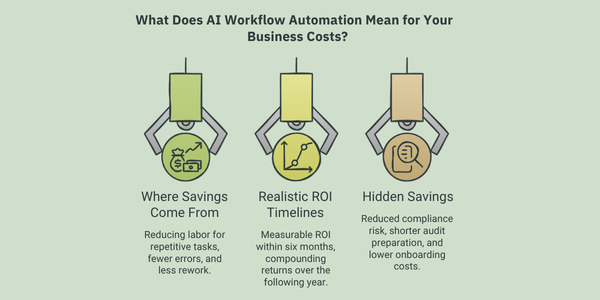
AI workflow automation lowers costs in direct and indirect ways. The savings are broader than most businesses expect before they deploy it.
Where the Savings Actually Come From
The biggest savings come from reducing the labor required to process high-volume repetitive work. Data extraction, document classification, exception routing, and status updates all cost far less when handled by automation. Fewer errors also mean less rework, fewer compliance penalties, and lower costs from problems caused by processing mistakes.
What Realistic ROI Timelines Look Like
Most enterprises see measurable ROI within the first six months, driven by speed and error reduction. Over the following year, returns compound as more workflows are automated and teams shift their time toward higher-value work. The two-to-three year ROI is typically stronger than what businesses project at the point of adoption.
The Hidden Savings Most Businesses Overlook
Compliance risk drops when every process follows consistent, documented logic. Audit preparation time shrinks when workflows generate automatic records. Onboarding costs fall when new employees do not need to be trained on manual processes that automation now handles. These savings add up quietly but contribute meaningfully over time.
How Does AI Workflow Automation Change Things for Your Team?
Removing repetitive work from people’s plates changes not just what they do, but how they feel about their work.
For a detailed perspective on why teams and enterprises are moving towards AI workflow orchestration, read our blog on Why Enterprises are Suddenly Shifting Towards AI Workflow Automation.
Taking Repetitive Work Off People’s Plates
The tasks automation absorbs, such as data entry, chasing approvals, and reformatting documents, are the ones people find least engaging. Removing them frees the team to focus on work that requires judgment and critical thinking. Teams that move to AI-augmented workflows consistently report better output quality when routine volume is no longer consuming their time.
The Effect on Job Satisfaction and Focus
High-volume manual work is a leading driver of burnout in operational roles. When automation takes over that work, people regain the capacity to focus on tasks that are more meaningful and more complex. Engagement rises, turnover intention drops, and the work itself becomes more rewarding.
New Opportunities for Upskilling
Automation redefines roles rather than eliminating them. When routine processing shifts to AI, the skills that matter most become interpretation, oversight, and process improvement. This creates a clear upskilling path. Enterprises that invest in developing these skills build an advantage that grows as both the team and the technology mature.
How Does AI Workflow Automation Improve Customer Experience?
Customers experience the difference directly: faster responses, more consistent service, and interactions that feel relevant to them.
Faster Responses and Resolutions
Most customer frustration comes from waiting. AI workflow automation processes requests and generates responses in real time, handling queries automatically that previously required a human to read, look up, and reply. Response times drop significantly, and that improvement is immediately visible to customers.
More Consistent Experiences Across Touchpoints
When service depends on individual team members, quality varies. AI workflow automation applies the same standard to every interaction, across every channel, at any time of day. Customers receive the same quality of service whether they reach out by email, chat, or phone.
Personalization That Was Not Possible Before
AI workflow automation connects customer data, interaction history, and behavioral signals into a single workflow that informs every response. The system tailors each interaction to the specific customer rather than treating everyone the same. This level of personalization was previously only possible for the highest-value accounts. Automation extends it to everyone.
The Business Case for AI Workflow Automation Goes Beyond Efficiency
Efficiency is the most visible benefit, but it is not the most important one. The deeper value lies in what automation makes possible that was not possible before: processing unstructured data at scale, making consistent decisions across thousands of daily interactions, and giving teams the capacity to focus on work that drives real competitive advantage.
The question for most enterprises is no longer whether to adopt AI workflow automation, but where to start and how to scale it effectively.
Aekyam is an enterprise AI Orchestration platform that helps businesses capture these benefits without rebuilding existing infrastructure. It connects your applications, data, and AI into a unified workflow layer that handles complex processes, manages unstructured data, and scales as your operations grow.
Connect with the team of experts at Aekyam or request a demo to know how we can help you revive the benefits of workflow automation.
Frequently Asked Questions
1. How can I reduce compliance risk for my healthcare business with AI workflow automation?
AI workflow automation can help you reduce compliance risk by standardizing critical business processes and applying consistent rules to patient data management, prior authorizations, billing, claims processing, and regulatory workflows. Every action is automatically logged, creating a complete audit trail while flagging exceptions before they become compliance issues. This reduces manual errors, improves regulatory compliance, and maintains secure, traceable workflows without relying on constant manual oversight.
2. How can AI workflow automation help me make my organization audit ready?
AI workflow automation can help make your organization audit-ready by turning compliance into part of everyday operations. Every action, decision, approval, and system update is automatically recorded with timestamps and complete traceability, so instead of scrambling to prepare documents before an audit, you can instantly retrieve a detailed history of every workflow. This helps businesses maintain continuous audit readiness by creating transparent, compliant, and fully traceable processes across departments.
3. How can AI workflow automation ensure quicker employee support as an IT associate?
AI workflow automation can help you deliver quicker employee support by automating repetitive IT service requests. It classifies incoming tickets, identifies common issues, retrieves relevant knowledge, and either resolves requests automatically or routes them to the right technician with full context. By eliminating manual triaging, this reduces response times, improves service desk efficiency, and frees IT teams to focus on complex technical issues instead of repetitive support tasks.
4. How can AI workflow automation help me spend less time on admin as an HR associate?
AI workflow automation can help you spend less time on admin by streamlining employee onboarding, leave management, policy requests, document verification, and employee record updates, automatically processing requests and syncing data across HR systems. This means less time spent on routine administration and more time supporting employee engagement, talent development, and strategic workforce initiatives.
5. How can I reduce processing errors for my business with AI workflow automation?
AI workflow automation can help you reduce processing errors by eliminating manual data entry, inconsistent decision-making, and disconnected workflows that cause most mistakes. It automatically captures information, validates data, applies standardized business rules, and orchestrates workflows across connected systems. This improves data accuracy, reduces operational errors, lowers rework costs, and delivers more reliable business processes.
6. How does Aekyam's AI workflow automation actually improve my business operations?
Aekyam's AI workflow automation platform connects applications, data, APIs, and business systems into a single intelligent workflow layer. It can process structured and unstructured data, automate decisions based on business rules and AI, trigger actions across multiple enterprise applications, and continuously optimize workflows. By eliminating manual bottlenecks, Aekyam enables organizations to accelerate operations, reduce costs, improve process accuracy, strengthen compliance, and scale automation without disrupting existing systems. The result is faster execution, greater operational visibility, and more time for employees to focus on high-value work.
Share
Read Similar Blogs