


Introduction
Buying an enterprise workflow automation platform is the easy part. Making it stick is the work. Plenty of rollouts stall because the plan was a go-live date and a hope.
A good implementation reads more like a renovation than a purchase. You survey the house, fix one room first, then move on to the rest, and you keep the people who live there informed along the way.
This guide gives you the practical steps, a realistic view of timelines, the people you need involved, the ROI you can reasonably expect and the mistakes that sink projects. If you’re still comparing options, read our guide on what to look for when evaluating a platform first. For the full overview, see our comprehensive guide on enterprise workflow automation.
What Are the Key Steps to Implementing a Workflow Automation Platform?
Planning and workflow mapping
Start on paper, before you touch the software. Pick the processes to automate, document how they run today and note who touches them, which systems they use and where they stall. This step often reveals redundant approvals and steps you can delete before automating anything. Define a single metric for each workflow, such as cycle time or error rate, so you can measure the change.
Running a pilot with one or two workflows
Choose one or two workflows that are high-volume, rule-based and clearly owned. Build them, test them with real users and fix what breaks. A pilot is your cheapest way to find integration problems, unclear rules and training gaps. It also gives you a result to show leadership.
Full rollout across teams
Once the pilot is stable, expand in planned waves. Reuse connectors and templates from the first workflows, add teams gradually and keep a backlog so demand doesn’t outrun support. Aekyam’s platform is built for reuse, which helps each wave go faster than the last.
Training and change enablement
People adopt what they understand. Run training before each wave, name a few champions in each team and publish simple guides. Treat communication as part of the project plan, not an afterthought.
Who Should Be Involved in the Implementation Process?
IT and the technical implementation team
They configure integrations, security and environments. Involve them early so architecture decisions don’t become late surprises.
Department leads who own the workflows
They know how the process really runs, including the exceptions nobody wrote down. Without them, you automate the official process instead of the real one.
Executive sponsor for buy-in and prioritization
A visible sponsor clears roadblocks, settles priority disputes and signals that this matters. Various research on change management found that projects with strong adoption programs are six times more likely to meet their objectives.
End users who will run the workflows daily
They’ll spot usability problems fast. Include them in testing, and their feedback becomes your best early warning system.
What ROI Can You Expect From Workflow Automation?
ROI comes from three sources: time saved, fewer errors and lower labor cost. The size of each depends on the process.
The headline numbers
Recent research suggests payback takes longer than many vendor claims imply, so treat any figure as a range, not a promise.
Deloitte’s 2025 survey of 1,854 executives across Europe and the Middle East found that most respondents achieved satisfactory ROI on a typical AI use case within two to four years, well beyond the seven to twelve months typically expected for technology investments. Only 6% reported payback in under a year, and even among the most successful projects, just 13% saw returns within 12 months.
Results also differ by technology: among generative AI users, 15% had already achieved significant, measurable ROI and 38% expected it within a year, while for agentic AI only 10% of organizations were realizing significant ROI. The survey covers AI use cases broadly, not workflow automation specifically, so treat it as the best recent guide to timing, not a precise benchmark for any one process.
Build your own number
A simple formula works: hours saved multiplied by hourly cost, plus the value of avoided errors, minus implementation cost. That gives you the net benefit. Forrester’s Total Economic Impact methodology calculates ROI by dividing net benefits (benefits less costs) by costs (example study), so divide by implementation cost to get a percentage. microsoft
Be conservative. Forrester’s method risk-adjusts benefits downward. In a 2024 study for Salesforce, it reduced one benefit by 10% to account for risk (Forrester TEI). Don’t assume automation removes all manual time, because exceptions and oversight remain. Ardent Partners’ 2025 research found invoice exception rates averaging 14%, with best-in-class teams reaching 49.2% straight-through processing (Tungsten Automation summary), so roughly half of invoices still get human attention even at the top. An assumption of about 80% is a reasonable rule of thumb, but test it against your own exception rate.
How do you measure success after implementation?
Time saved alone can mislead. Workday’s 2025 survey found that 85% of employees reported saving one to seven hours a week with AI, but nearly 40% of those savings were lost to rework such as correcting errors and verifying outputs (Workday). The report recommends tracking quality, accuracy and decision speed alongside time savings (Journal of Accountancy). An EY Parthenon survey of 1,200 CEOs found that 23% said productivity gains were being absorbed before reaching the bottom line, and only 16% had clear, real-time visibility into AI costs and returns (Newsweek). Deloitte’s 2025 survey coverage suggests tracking ROI with a multi-dimensional index, not a single savings figure (ACCA).
Track these three, and record a baseline before launch:
- Cost per transaction. Top-performing AP teams process an invoice for $2.78, against an all-buyer average of $10.89 (Ardent Partners via Corpay).
- Quality. Track error or exception rate. Pooled data-entry error rates were 0.74% for optical scanning, 0.29% for single entry and 0.14% for double entry (Garza & Zozus, 2023), and the Ardent exception-rate benchmark is above.
- Cycle time. Top AP teams take 3.1 days per invoice against 10.9 days on average (Ardent Partners via Corpay)
- Measure before you launch. Harvard Business School’s Iavor Bojinov says companies should build measurement into AI deployments from the outset, not calculate ROI afterwards (Newsweek).
Cycle time per workflow
Measure how long each process takes end to end, and compare it with your baseline. It’s the clearest early signal.
Adoption rate across teams
A workflow nobody uses saves nothing. Track how many eligible requests flow through the platform instead of email or spreadsheets.
Cost per process before versus after automation
Calculate the cost of a completed process, including labor and rework, before and after. This is the number finance will trust.
Set a baseline before launch. If you don’t know how long a process takes today, you can’t prove it’s faster tomorrow. Even a rough sample of a few weeks of manual data is better than none, and it keeps the conversation with finance grounded in facts.
Compare your results against the criteria you set when choosing the platform, and review them quarterly.
What Common Implementation Mistakes Should You Avoid?
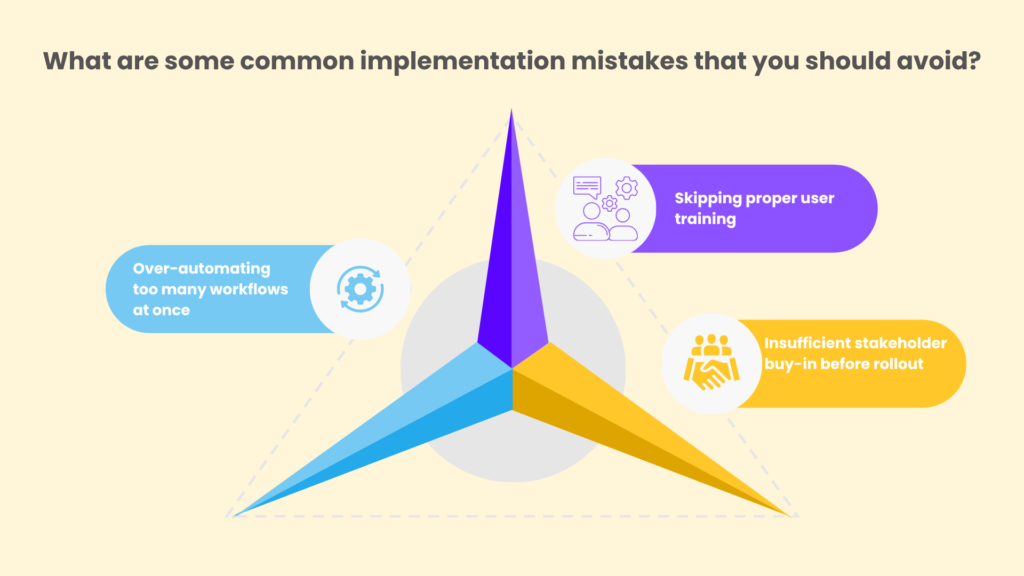
Over-automating too many workflows at once
Ambition is good. Ten simultaneous launches are not. You’ll overload your support team and bury the lessons from the first few workflows. Go wave by wave.
Skipping proper user training
If people don’t know how to use a workflow, they’ll go back to email. Budget time for training and make help easy to find.
Insufficient stakeholder buy-in before rollout
If department heads learn about the project at launch, expect resistance. Involve them in mapping and design, and give them a stake in the results.
Ensuring a Successful Enterprise Workflow Automation Platform Rollout
A strong rollout comes down to a few habits. Map before you build. Pilot before you scale. Involve the right people early. Measure from the start. And keep your waves small enough to support properly.
There’s also a reason to stay disciplined: Gartner has cautioned that over 40% of agentic AI projects may be cancelled by the end of 2027 because of escalating costs, unclear business value or inadequate risk controls. A clear pilot, a clear metric and clear ownership guard against all three.
Aekyam is an AI-powered orchestration platform that connects applications, data and AI agents to automate enterprise workflows. Book a demo or contact us to plan your first pilot.
Frequently Asked Questions
Do you need a dedicated automation team?
For a small rollout, a part-time owner and a few champions can work. As you scale, a dedicated team or center of excellence keeps standards consistent, supports builders and prevents duplicate work. Many organizations grow into it gradually.
What happens if a workflow needs to change mid-rollout?
Change is normal. Use version control and a test environment so you can update a workflow without disrupting live work. Communicate changes to users, and note why the change was made.
Is a phased rollout better than a full launch?
For most enterprises, yes. Phasing limits risk, lets you learn from early workflows and keeps support manageable. A full launch only makes sense for very simple, low-risk processes.
Can you calculate ROI before implementation, not just after?
Yes, and you should. Estimate current hours, error rates and costs for a candidate process, apply conservative improvement assumptions and subtract implementation cost. Revisit the estimate after the pilot, once you have real data.
What internal resources are needed during implementation?
Expect time from IT for integrations and security, department leads for process knowledge, an executive sponsor, and end users for testing and feedback. You’ll also need someone to own training and communications.
How do you handle downtime risk during migration to automation?
Run the new workflow in parallel with the manual process for a short period, so you can compare results and fall back if needed. Schedule cutovers outside peak periods, and keep a rollback plan ready.
Share