


Introduction
Most automation projects start with a tool demo. Somebody sees a slick workflow builder, gets excited, and buys. Six months later, a handful of workflows are running, and the rest of the platform sits idle.
The fix is simple. Flip the order. Decide which processes hurt the most, then choose the enterprise workflow automation platform that fits them. Use cases tell you what the platform must do. The platform comparison only matters after that.
This blog walks you through the most valuable enterprise use cases, how they help different departments, what makes a platform the right one for you and how to match it to your size and complexity. You’ll finish with four questions that make selection far easier.
If you want the bigger picture first, start with our comprehensive guide to enterprise workflow automation platforms.
What Are the Most Valuable Use Cases for Enterprise Workflow Automation?
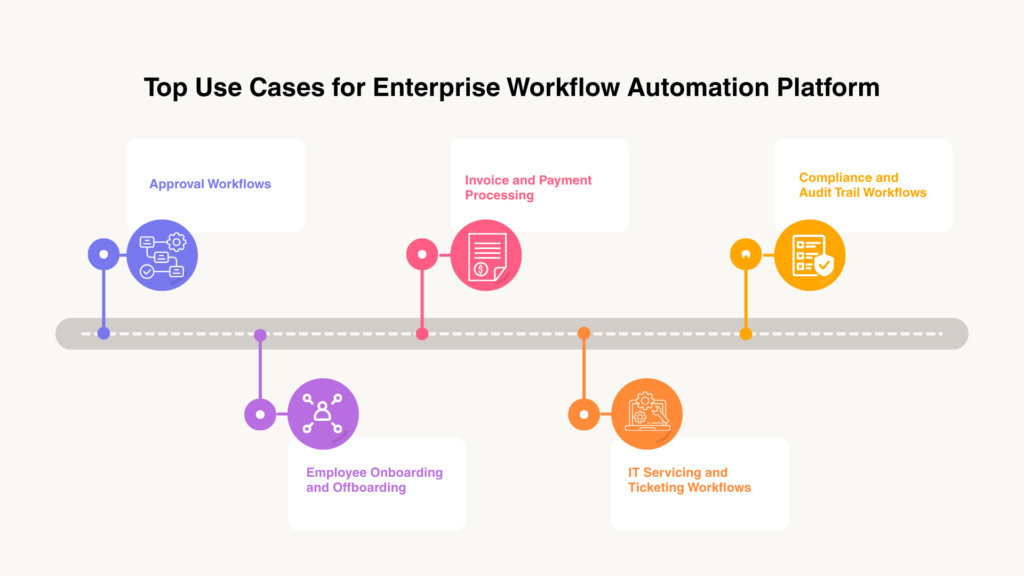
The best candidates share three traits: they repeat often, they follow rules and they involve more than one person or system. Here are the five that show up most.
Approval workflows (budget, contracts, purchase orders)
Approvals are the classic bottleneck. A request sits in someone’s inbox, gets forgotten and triggers a chase email. Automated routing sends each request to the right approver, sets deadlines and escalates when nobody responds. This also means that the approval cycles might shrink from three to five days to under four hours.
Employee onboarding and offboarding
Onboarding touches HR, IT, facilities and the hiring manager. Automating it means accounts, equipment and training get set up in parallel. Published figures put the gain at about 67% faster onboarding. Offboarding matters just as much, since access has to be removed promptly.
Invoice and payment processing
Invoices need capture, matching, approval and posting. As per a research from Ardent Partners, companies with the most efficient invoice processing spend 79% less per invoice and finish 79% faster than their peers.
IT service and ticketing workflows
Routing tickets by type, requesting approvals for access and provisioning accounts are all rule-based. Automating them clears the repeat work so your IT team can focus on the hard problems. In randomized tests across six enterprise deployments, Zendesk found that machine-learning-based ticket routing cut agent handling time by 9–21% in the four where the effect was statistically significant.
Compliance and audit-trail workflows
When every step is logged, who approved what and when is a search, not a scramble. Compliance workflows enforce required steps and keep the evidence automatically.
How Does Workflow Automation Benefit Different Departments?
HR: faster onboarding, reduced admin load
HR teams spend a surprising share of their time on forms, reminders and status updates. Workflows take over that coordination, which leaves HR free for the human side of the job.
Finance: faster close cycles, fewer manual errors
Finance depends on accuracy. A Gartner research found that companies that digitize with high staff acceptance of the technology see a 75% reduction in financial errors, which is why cutting manual rekeying matters.
IT: quicker ticket resolution, standardized access provisioning
Standard requests follow standard paths. That makes provisioning consistent and tickets faster to close, and it reduces the risk of someone getting the wrong access.
Sales and CRM: faster lead routing and quote turnaround
Speed to lead matters. Automated routing removes that lag. Quote approvals can move faster too when pricing rules are built into the workflow.
Legal: streamlined contract review and approvals
Contracts pass through many hands. Workflows can route each draft to the right reviewer, track versions and record approvals, so nothing stalls on one person’s desk.
Explore more by function on Aekyam’s solutions by team page.
What Makes a Workflow Automation Platform “The Best” for Your Business?
There’s no universal best. There’s the best for your situation. Think of it like buying a vehicle: a delivery van and a sports car are both excellent, but only one suits your job. Four factors do most of the sorting.
- Scalability to your current and future workflow volume
A platform that handles 20 workflows may struggle with 2,000. Ask how it performs as users, volumes and departments grow, and whether you can replicate a proven workflow elsewhere without rebuilding it.
- Ease of use for non-technical teams
If only developers can build workflows, you’ve created a new queue. Look for a visual, low-code builder that business teams can learn quickly. Aekyam’s platform is designed around low-code automation for this reason.
- Depth of integrations with your existing tech stack
Breadth is easy to advertise. Depth is what matters. Check how well the platform connects to your own CRM, ERP and HR systems, not just how many connectors it lists. See how application orchestration works across enterprise systems.
- Fit with your industry’s specific compliance needs
A bank, a hospital and a manufacturer don’t face the same rules. Confirm the platform supports the audit trails, access controls and data handling your sector requires.
One buyer’s framework turns these factors into a weighted scorecard, with governance counting for more than integration coverage. Set your own weights before you look at vendors.
How Do You Match a Platform to Your Enterprise’s Size and Complexity?
What small and mid-sized businesses typically need
Speed to value and simplicity. You want prebuilt templates, quick setup and pricing that doesn’t require a procurement project. A small team can’t afford a platform that needs a specialist to run.
Keep your first goals modest. Automating two or three approval flows well beats rolling out a dozen half-finished ones, and it gives you a story to share with leadership.
What mid-market companies should prioritize
Mid-sized firms often sit awkwardly between tools built for ten-person teams and platforms built for global enterprises. Prioritize integration depth and governance that can grow with you, so you don’t replatform in two years.
What large, multi-department enterprises require
Scale, security and control. That means role-based access, audit logs, support for hybrid environments, and the ability to let many departments build safely under shared standards.
At this size, the hard part is not building workflows. It’s keeping hundreds of them consistent. Look for central visibility into what’s running, clear ownership for each workflow and a way to promote changes from test to production without breaking anything. Enterprises also tend to run a mix of cloud and on-premises systems, so check that the platform handles both.
See how Aekyam supports different organizations by company size.
What Questions Should You Ask Before Selecting a Platform?
What workflows do we need to automate first?
List your top five candidates and rank them by volume, pain and clarity. Pick one or two for a pilot. The platform should be able to handle them well.
Which systems must this integrate with?
Write down every system a first workflow touches. If the platform can’t connect to them cleanly, move on.
Who will own and maintain workflows internally?
Every workflow needs an owner after launch. Decide whether IT, a center of excellence or the business teams will maintain them, and choose a platform that suits that person’s skills.
What’s our realistic budget and timeline?
Include licenses, implementation, integrations and training. Set a timeline for the pilot, not just the full rollout.
Turning Use Cases Into the Right Platform Choice
Use cases are your compass. Approvals, onboarding, invoicing, IT requests and compliance give you a short list of what to automate. Department benefits show you who gains. Four selection factors and four questions keep the choice grounded in your reality.
The teams that get the most from automation share one habit: they define the problem before they shop for the solution. Do that, and the platform decision gets much easier.
Aekyam is an AI-powered orchestration platform that connects applications, data and AI agents to automate workflows across teams. Request a demo or contact us to map your first use cases.
Frequently Asked Questions
Can one platform handle multiple departments at once?
Yes, and that’s often the goal. A single platform lets HR, finance, IT and sales share connectors, governance and reporting. The key is shared standards, so each team builds on a common foundation instead of its own island.
What’s the difference between workflow automation and BPM?
Business process management (BPM) is the discipline of designing, modeling and improving processes. Workflow automation is how you execute them. Many modern platforms combine both, but BPM focuses on the process, while automation focuses on running it.
How many workflows should a business start with?
Start with one or two. A small pilot proves value, teaches your team the platform and exposes integration issues early. Add more once the first ones are stable and trusted. Starting small also protects you from the trap of over-automating before anyone has learned what good looks like.
Do workflow automation platforms work with legacy software?
Often, yes. Legacy systems are one of the most common barriers, with 58% of organizations citing integration as their top challenge. Ask vendors how they connect to older systems, such as through APIs, file exchange or adapters.
Is coding knowledge required to build workflows?
Not for most workflows. Low-code and no-code builders let business users design flows visually. Developers still help with complex logic and custom integrations, so check where your platform draws that line.
How do you prioritize which processes to automate first?
Score each candidate on volume, pain, clarity and risk. High-volume, rule-based processes with a clear owner come first. Leave messy, judgment-heavy work for later, once your team has experience.
Share
Read Similar Blogs