


Introduction
Evaluating an enterprise workflow automation platform can feel like comparing apples, oranges and a few things that aren’t fruit at all. Every vendor claims low-code, AI, scale and security. Every demo looks smooth. The differences only show up months later, when a workflow needs to change or a system won’t connect.
The way through is a structured evaluation. Decide what matters, weight it, test it against your own processes and watch for warning signs. That turns a gut-feel purchase into a decision you can defend to finance, IT and the board.
This blog covers the features to look for, the integrations that matter, how to judge scalability, the security standards to expect, how pricing models differ and the red flags to avoid. If you’re still deciding what to automate, start with our guide to enterprise workflow automation platforms.
What Key Features Define a Strong Enterprise Workflow Automation Platform?
The top features that define a robust enterprise workflow automation platform are:
Low-code and no-code workflow builder
Your business teams should be able to build and adjust workflows without opening a ticket. A visual builder with reusable templates shortens the path from idea to live process. Check the ceiling too: when logic gets complex, can a developer extend it with code? The best builders serve both groups without forcing either to work around the other.
AI-assisted automation capabilities
AI is changing what a platform can do. Gartner expects 40% of enterprise applications to include task-specific AI agents by the end of 2026. Ask what the AI actually does: drafting workflows, reading documents, routing decisions or accelerating integration builds.
Built-in analytics and reporting
You’ll want to see cycle times, bottlenecks and failure rates without exporting data to another tool. Good reporting also gives you the evidence to expand automation later.
Mobile access for approvals on the go
Approvals stall when approvers are away from their desks. Mobile access lets managers approve, reject or comment from anywhere, which keeps work moving.
How Does Workflow Automation Benefit Different Departments?
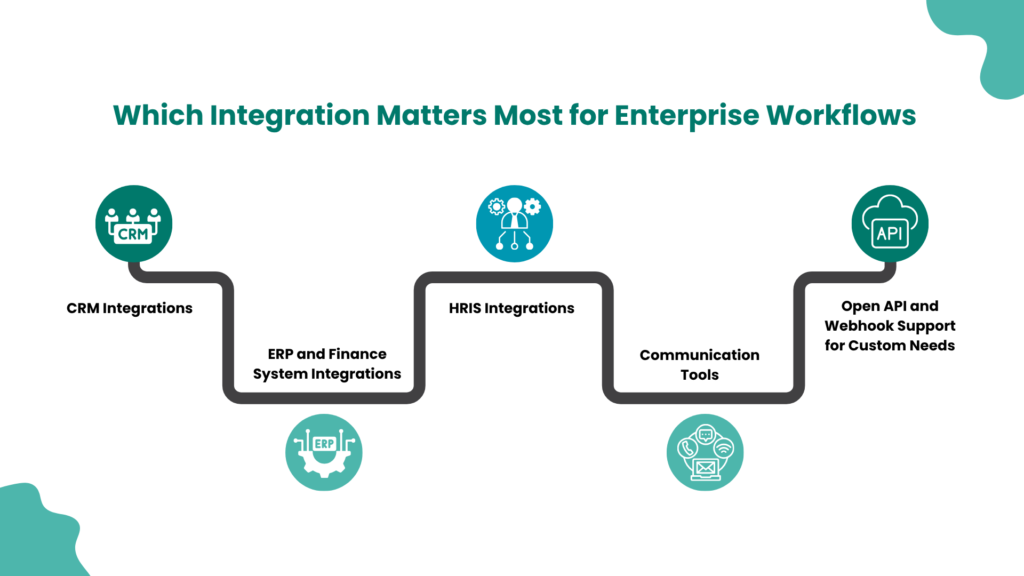
A platform is only as useful as the systems it reaches. Don’t count connectors. Test the ones you rely on.
CRM integrations
Sales and customer data drive lead routing, quotes and renewals. Confirm the platform can read and write to your CRM, including custom objects and fields.
ERP and finance system integrations
Invoices, purchase orders and reconciliations all touch finance systems. Check for reliable, two-way data exchange and clear error handling.
HRIS integrations
Onboarding, leave and offboarding depend on HR data. The platform should pull employee records and trigger actions in downstream systems.
Communication tools
Notifications and approvals often happen in email or chat. Look for native support so approvers can act without logging in somewhere new.
Open API and webhook support for custom needs
No connector library covers everything. Open APIs and webhooks let you reach homegrown systems. A reusable library, such as Aekyam’s integration marketplace of prebuilt adapters, also helps you build once and reuse.
During the evaluation, ask for a proof of concept that connects two or three of your real systems. Aekyam’s application orchestration page shows how this works across enterprise systems
How Important Is Scalability When Evaluating a Platform?
Very. A platform that works for a pilot can buckle under real volume, and replatforming later is expensive and disruptive. Think of it like a road: it’s easy to drive on when it’s empty, and the real test is rush hour. Scalability has three layers.
Handling growing numbers of users and workflows
Ask how many concurrent workflows and users the platform supports in production, and request references from customers at your scale.
Performance under increasing data volume
Data grows faster than headcount. Check how the platform behaves as records, documents and API calls multiply, and whether performance degrades or costs spike.
Ability to add departments and business units over time
Your first workflow will be in one team. Your tenth will be in another region. Look for multi-team governance, shared connectors and the ability to replicate a workflow without rebuilding it.
What Security and Compliance Standards Should the Platform Meet?
Security is where weak platforms hide. Ask for evidence, not assurances.
Certifications such as SOC 2
An independent audit report, such as SOC 2, shows the vendor’s controls have been tested. Ask for the current report and read its scope.
Data privacy compliance
If you handle personal data from the EU, you’ll need to confirm GDPR compliance, including how data is stored, processed and deleted. Regulation is also tightening around automated decision-making. The EU AI Act is already reshaping procurement criteria for automated decision systems.
Role-based access control
Different people should see and do different things. Check for granular permissions by role, team and workflow, along with single sign-on.
Audit trails and activity logs
You should be able to answer who changed what and when. Look for complete, tamper-resistant logs that you can export for auditors.
Every buyer framework weighs these factors a little differently. Treat them as a starting point, set your own weights before you look at vendors, and don’t underweight governance.
How Do Pricing Models Differ Across Platforms?
Pricing is where comparisons get tricky. Three models dominate.
| Model | How it works | Watch for |
|---|---|---|
| Per-user | You pay for each seat. Published rates range from about $5 to $79 per user per month | Costs balloon when many occasional approvers need access |
| Per-workflow or per-task | You pay by automation or execution volume | Per-task pricing surprises as usage grows |
| Tiered enterprise and custom contracts | Negotiated packages, often with minimums | Opaque pricing and long commitments |
Per-user pricing
It’s predictable for small, fixed teams. It gets expensive when automation reaches the whole company.
Per-workflow or per-automation pricing
It tracks usage, so costs can follow value. But a busy workflow can drive a bill you didn’t forecast.
Tiered enterprise pricing and custom contracts
Enterprise deals can include implementation, support and security features. Get every inclusion in writing, and model costs at two or three times your starting volume. See how Aekyam pricing is structured.
What Red Flags Should You Watch for During Evaluation?
Signs of vendor lock-in
Watch for proprietary formats you can’t export, workflows that only run on the vendor’s infrastructure and exit terms that make leaving costly. Ask how you’d move your workflows elsewhere.
Weak or slow customer support
Test support during the trial. Submit a real question and see how fast and how well they answer. If it’s slow now, it’ll be slower when you’re a customer.
Limited customization or rigid workflow logic
If the platform can’t handle your exceptions, you’ll end up building workarounds. Bring a messy, real process to the demo and watch what happens.
Learn more about how to choose an enterprise workflow automation platform, and the top use cases to start with in our blog, How Do You Choose an Enterprise Workflow Automation Platform? Start With the Use Cases
Building a Shortlist of the Right Platforms
Start with a scorecard and your top use cases. Narrow the field to three or four vendors, run a proof of concept on a real workflow and check references at your scale. Weigh features, integrations, scalability, security, pricing and support against your priorities, not the vendor’s.
Keep the process honest by involving more than IT. Department leads know where the pain is, finance knows what the budget can bear and security knows what can’t be compromised. When all three score the same shortlist, the winner is usually clear, and the decision is far easier to defend.
Aekyam is an AI-powered orchestration platform that connects applications, data and AI agents to automate workflows. Request a demo or contact us to test it against your own processes.
Frequently Asked Questions
Should you prioritize AI features over integrations?
Integrations first. AI is only useful when it can reach your data and act in your systems. A platform with great AI and thin integrations will stall. Once the connections are solid, AI features multiply the value.
How do you test a platform before committing?
Run a proof of concept on one real workflow, using your own systems and data. Include a messy exception, an approval that times out and a failure. Involve the people who’ll build and use it.
What’s a reasonable evaluation timeline?
Plan for several weeks to a few months, depending on your size and procurement process. Spend the first stretch on requirements and scorecards, then shortlist, then run proofs of concept. Rushing the early steps costs more later.
How do you evaluate vendor customer support quality?
Test it. Ask a technical question during the trial and measure response time and depth. Check references, support hours, escalation paths and whether you’ll have a named contact.
Should you choose an all-in-one platform or best-of-breed tools?
It depends on your stack and team. All-in-one platforms reduce integration work and give you one place for governance. Best-of-breed tools can be stronger at specific tasks but add complexity. Many enterprises choose a central orchestration layer and connect specialist tools to it.
What role do customer reviews and analyst reports play in evaluation?
They help you build a shortlist and spot patterns, but they shouldn’t make the decision. Reviews can be uneven and analyst reports reflect general criteria. Treat them as inputs, then validate with your own proof of concept and references.
Share